Google Play 인앱 결제 영수증 검증과 처리
Spring Boot와 Google Cloud API를 사용해 Google Play 인앱 결제 영수증을 검증하고 처리하는 과정과 오류 해결 방법을 정리합니다.
현재 요구 사항
- Google Play 인앱 결제로 광고 제거 권한을 한 번 구매하면 계속 사용할 수 있게 합니다. 게임 재화처럼 사용하면 수량이 줄어 다시 구매하는 소비성 상품과 구분되는 ’비소비성 상품’입니다.
처리 흐름
이 글에서 ’영수증’은 종이 영수증이나 단순 결제 금액이 아니라, 구매를 Google API에서 조회할 때 필요한 정보를 뜻합니다. 특히 구매 토큰(purchase token)은 특정 구매를 식별해 서버가 실제 구매 상태를 확인할 때 사용하는 값입니다. Access Token은 서버가 API를 호출할 권한을 나타내므로 구매 토큰과 역할이 다릅니다.
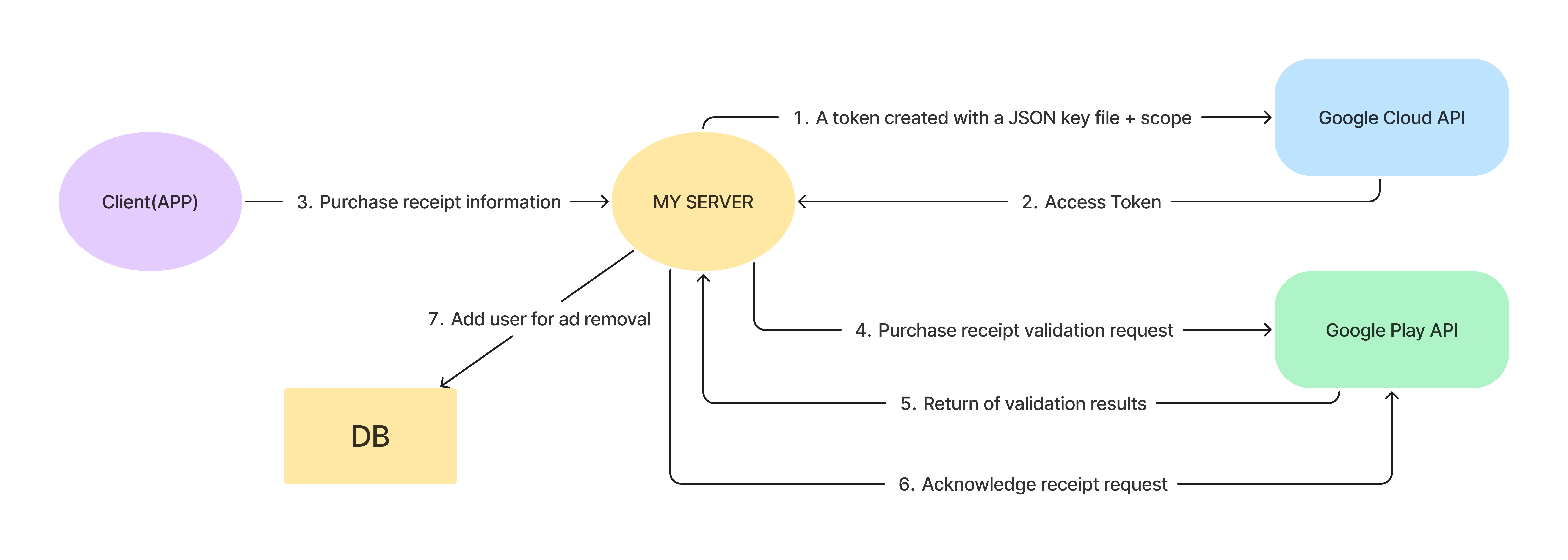
- 서버가 시작할 때 Google Cloud API를 통해 Google Play API 접근용 Access Token을 받습니다. 만료되면 자동 갱신합니다.
- 클라이언트에서 결제가 발생하면 영수증 정보를 받습니다.
- 영수증 정보로 Google Play Console API에 접근해 유효한 구매 영수증인지 확인합니다.
- 유효한 구매이면 Google Play API에 구매를 확인했다는 처리(acknowledgement)를 보냅니다. 카드 결제를 새로 승인하는 작업이 아니라, 앱이 구매를 확인했음을 스토어에 알리는 단계입니다.
- 영수증 처리 후 사용자를 광고 제거 사용자 테이블에 추가하고 구매 처리를 마칩니다.
이 과정을 진행하기 전에 두 가지를 알아야 합니다.
첫째, Google Play Console API에 접근하려면 Google이 발급한 인증 정보가 필요합니다. 이 정보는 Google Play Console이 아니라 Google Cloud Console에서 받아야 합니다.
둘째, 서비스 계정을 만드는 일과 해당 앱의 구매 정보를 다룰 권한을 주는 일은 다릅니다. Google Play Console에서 서비스 계정에 대상 앱과 필요한 작업의 접근 권한을 부여해야 합니다.
코드를 작성하기 전에 설정 작업을 먼저 해야 합니다. 코드가 아닌 설정에 관한 내용이므로 중요한 부분만 간단히 정리합니다.
1. Google Cloud Console 설정
Google Cloud Console에서 계정을 만들고 APIs & Services 탭에서 Credentials를 생성합니다. 이때 OAuth 2.0 Client ID가 아니라 Service Account를 만듭니다.
사용자 동의를 거치는 OAuth 클라이언트 방식도 있지만, 이 구현에서는 서버가 정해진 앱의 구매 정보를 검증해야 합니다. 사용자의 브라우저에서 권한을 허용하는 과정 없이 서버의 자격 정보로 호출할 수 있도록 Service Account를 사용했습니다.
Service Account를 만들면 계정 정보를 JSON으로 받을 수 있습니다. 이후에 사용할 수 있도록 내려받습니다. 파일 이름은 보통 project_id-xxxxxxxxx.json 형태지만 여기서는 편의상 profile.json이라 부르겠습니다.
서비스 계정을 생성한 뒤에는 Google Play Console에서 구매 조회·처리에 필요한 권한을 설정합니다. Google Cloud의 Owner·Editor나 Service Account Token Creator 역할과 Play Console의 앱·주문 접근 권한은 서로 다른 설정입니다. 토큰을 발급할 수 있다는 사실만으로 앱의 구매 정보를 조회할 수 있는 것은 아닙니다.
마지막으로 API Library 탭에서 Google Play Android Developer API를 Enabled 상태로 변경합니다.
2. Google Play Console 설정
Google Play Console에서 서비스 계정의 이메일에 대상 앱과 주문·구매 처리에 필요한 권한을 부여하고, 결제 테스트에 사용할 상품을 등록합니다. 이 글처럼 서비스 계정으로 서버 간 인증을 하는 흐름에서는 사용자 브라우저가 돌아올 Redirect URL을 등록하지 않습니다. 설정 단계는 Google Play Developer API 시작 가이드에서 확인할 수 있습니다.
이제 실제 코드를 작성해 보겠습니다. Google API를 사용하므로 위 설정을 제대로 마쳤다면 코드 자체는 어렵지 않습니다. 적절한 파라미터를 전달하는 부분이 조금 까다로웠는데, 코드 뒤에서 설명하겠습니다.
프로젝트 안에 인앱 결제 관련 코드를 담당하는 InAppPurchaseService.java 클래스를 따로 만들었습니다. Google API와의 모든 통신은 이 클래스가 담당하고, 기존 메인 서비스인 Service.java에서 구매 처리 로직을 구현했습니다.
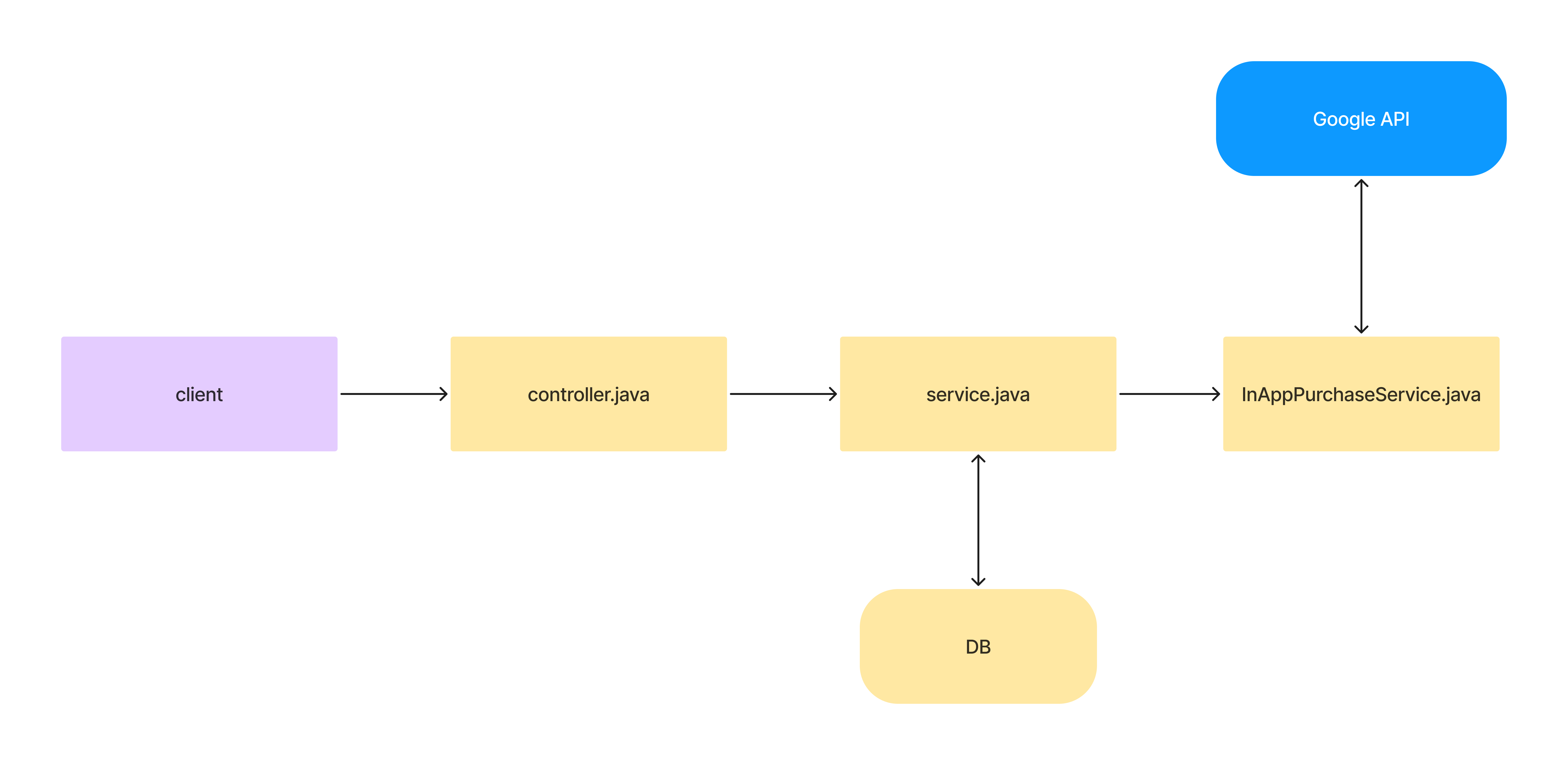
InAppPurchaseService.java
다음은 인앱 결제 처리의 핵심 코드입니다.
/**
 * Service class for handling in-app purchases using Google Play Billing Library.
 * This class provides methods for verifying and acknowledging purchase receipts.
 */
public class InAppPurchaseService {

  private final AndroidPublisher androidPublisher;

  /**
   * Constructor that initializes the AndroidPublisher client.
   * It sets up the necessary credentials and builds the AndroidPublisher instance.
   *
   * @throws GeneralSecurityException if there's a security-related exception
   * @throws IOException if there's an I/O error when reading the credentials file
   */
  public InAppPurchaseService() throws GeneralSecurityException, IOException {
    String serviceAccountKeyFilePath =
        getClass().getClassLoader().getResource("profile.json").getPath();

    try {
      GoogleCredentials credentials =
          GoogleCredentials.fromStream(new FileInputStream(serviceAccountKeyFilePath))
              .createScoped(
                  Collections.singleton("https://www.googleapis.com/auth/androidpublisher"));
      HttpRequestInitializer requestInitializer = new HttpCredentialsAdapter(credentials);

      this.androidPublisher =
          new AndroidPublisher.Builder(
                  GoogleNetHttpTransport.newTrustedTransport(),
                  GsonFactory.getDefaultInstance(),
                  requestInitializer)
              .setApplicationName("MyApplication")
              .build();

      credentials.refresh();
    } catch (IOException e) {
      log.info("Error occurred while creating credentials: " + e.getMessage());
      e.printStackTrace();
      throw e;
    }
  }

  /**
   * Verifies the purchase receipt with Google Play.
   *
   * @param packageName The package name of the app
   * @param productId The ID of the product that was purchased
   * @param purchaseToken The token that was provided to the user after the purchase (receipt)
   * @return ProductPurchase object containing the purchase details
   * @throws ReceiptVerificationException if there's an error during verification
   */
  public ProductPurchase verifyReceipt(String packageName, String productId, String receipt)
      throws ReceiptVerificationException {
        try{
          return androidPublisher
          .purchases()
          .products()
          .get(packageName, productId, receipt)
          .execute();
        } catch (IOException e) {
          if (e instanceof GoogleJsonResponseException) {
                GoogleJsonResponseException gjre = (GoogleJsonResponseException) e;
                if (gjre.getStatusCode() == 401) {
                    throw new ReceiptVerificationException("Authentication error: Please check your API key or permissions.", e);
                } else if (gjre.getStatusCode() == 404) {
                    throw new ReceiptVerificationException("Receipt not found: Please check the package name, product ID, and purchase token.", e);
                }
            }
            throw new ReceiptVerificationException("Error occurred during receipt verification", e);
        }
  }

  /**
   * Acknowledges the purchase receipt with Google Play.
   *
   * @param packageName The package name of the app
   * @param productId The ID of the product that was purchased
   * @param receipt The token that was provided to the user after the purchase
   * @param userId The ID of the user who made the purchase
   * @throws ReceiptAcknowledgementException if there's an error during acknowledgement
   */
  public void acknowledgeReceipt(String packageName, String productId, String receipt, String userId) throws ReceiptAcknowledgementException {
    try {
      ProductPurchasesAcknowledgeRequest request = new ProductPurchasesAcknowledgeRequest()
      .setDeveloperPayload(userId);
        androidPublisher.purchases().products()
            .acknowledge(packageName, productId, receipt, request)
            .execute();
    } catch (IOException e) {
        if (e instanceof GoogleJsonResponseException) {
            GoogleJsonResponseException gjre = (GoogleJsonResponseException) e;
            if (gjre.getStatusCode() == 401) {
                throw new ReceiptAcknowledgementException("Authentication error: Please check your API key or permissions.", e);
            } else if (gjre.getStatusCode() == 404) {
                throw new ReceiptAcknowledgementException("Receipt not found: Please check the package name, product ID, and purchase token.", e);
            }
        }
        throw new ReceiptAcknowledgementException("Error occurred during receipt acknowledgement", e);
    }
  }

  public static class ReceiptVerificationException extends IOException {
    public ReceiptVerificationException(String message, Throwable cause) {
        super(message, cause);
    }
  }

  public static class PurchaseProcessingException extends Exception {
    public PurchaseProcessingException(String message) {
        super(message);
    }

    public PurchaseProcessingException(String message, Throwable cause) {
        super(message, cause);
    }
  }

  public static class ReceiptAcknowledgementException extends Exception {
    public ReceiptAcknowledgementException(String message) {
        super(message);
    }

    public ReceiptAcknowledgementException(String message, Throwable cause) {
        super(message, cause);
    }
  }
}
verifyReceipt 메서드는 인앱 상품의 구매 상태를 나타내는 ProductPurchase를 반환합니다. 구조는 다음과 같습니다.
{
  "kind": string,
  "purchaseTimeMillis": string,
  "purchaseState": integer,
  "consumptionState": integer,
  "developerPayload": string,
  "orderId": string,
  "purchaseType": integer,
  "acknowledgementState": integer,
  "purchaseToken": string,
  "productId": string,
  "quantity": integer,
  "obfuscatedExternalAccountId": string,
  "obfuscatedExternalProfileId": string,
  "regionCode": string,
  "refundableQuantity": integer
}
자세한 내용은 Google Android Publisher API 문서를 참고하세요.
purchaseState는 현재 구매 상태를 구분하며 값이 0이면 구매가 완료된 상태입니다. 반면 acknowledgeReceipt 메서드는 정상 처리 시 응답 본문이 비어 있으므로 반환값이 없습니다. 응답 코드에 따른 예외를 처리하면 정상 처리 여부를 확인할 수 있습니다.
이제 InAppPurchaseService.java의 메서드를 호출하는 부분을 살펴보겠습니다. 이 글의 목적은 영수증 검증과 처리이므로 그 이후의 실제 구매 반영 로직은 생략합니다. 애플리케이션마다 구매 처리 방식이 달라 공통적인 의미가 크지 않기 때문입니다.
/**
 * Process in-app purchase and verify receipt
 *
 * @param inAppPurchaseDTO DTO containing purchase information
 * @return Result of purchase processing
 * @throws GeneralSecurityException If there's a security-related exception
 * @throws IOException If there's an I/O error
 */
@Transactional(rollbackFor = Exception.class)
public int inAppPurchase(InAppPurchaseDTO inAppPurchaseDTO)
    throws GeneralSecurityException, IOException {
      try {
        ProductPurchase productPurchase = inAppPurchaseService.verifyReceipt(
            inAppPurchaseDTO.getPackageName(),
            inAppPurchaseDTO.getProductId(),
            inAppPurchaseDTO.getReceipt()
        );

        int purchaseProcessResult = processPurchase(productPurchase, inAppPurchaseDTO);
        return purchaseProcessResult;
    } catch (ReceiptVerificationException e) {
      log.error("Error occurred during receipt verification: " + e.getMessage());
      throw new RuntimeException("Receipt verification failed", e);
    } catch (InAppPurchaseService.PurchaseProcessingException e) {
      log.error("Error occurred during purchase processing: " + e.getMessage());
      throw new RuntimeException("Purchase processing failed", e);
    } catch (Exception e) {
      log.error("Unexpected error occurred: " + e.getMessage());
      throw new RuntimeException("Error during in-app purchase", e);
    }
}

private int processPurchase(ProductPurchase productPurchase, InAppPurchaseDTO inAppPurchaseDTO) throws PurchaseProcessingException {
  if(productPurchase.getPurchaseState() != 0){
    throw new PurchaseProcessingException("Purchase not completed. State: " + productPurchase.getPurchaseState());
  }
  log.info("Purchase completed. State: " + productPurchase.getPurchaseState());

  if(isPurchaseAlreadyProcessed(productPurchase.getOrderId())){
    throw new PurchaseProcessingException("This purchase has already been processed.");
  }
  log.info("Duplicate processing prevention completed");

  try {
    // Update user status (e.g., remove ads)

    inAppPurchaseService.acknowledgeReceipt(
      inAppPurchaseDTO.getPackageName(),
      inAppPurchaseDTO.getProductId(),
      inAppPurchaseDTO.getReceipt(),
      inAppPurchaseDTO.getPlayerId()
    );
    log.info("Receipt acknowledgement completed");

    // Save receipt record
    return 1;
  } catch(InAppPurchaseService.ReceiptAcknowledgementException e){
    log.error("Error occurred during receipt acknowledgement: " + e.getMessage());
    throw new RuntimeException("Receipt acknowledgement failed", e);
  } catch(Exception e){
    log.error("Unexpected error occurred: " + e.getMessage());
    throw new RuntimeException("Error during in-app purchase processing", e);
  }
}

private boolean isPurchaseAlreadyProcessed(String orderId) {
  return mapper.isPurchaseAlreadyProcessed(orderId);
}
응답값을 확인하고 다음 처리를 이어 가면 되므로 호출 자체는 어렵지 않습니다. 다만 Google API를 요청할 때 위 코드의 InAppPurchaseDTO(클라이언트가 보낸 구매 정보를 담는 객체)에서 어떤 정보를 사용해야 하는지는 분명히 알아둘 필요가 있습니다.
public class InAppPurchaseDTO {
  private String playerId;      // 사용자를 구분하는 고유 값
  private String packageName;   // 앱 패키지 이름. 예: com.test.app
  private String transactionId; // 주문 ID. 예: GPA.XXXX.XXXXX.XXXXX.XXX
  private String productId;     // 구매 상품 ID. 예: ad_remover
  private String receipt;       // 구매 토큰
}
관련 글을 여러 개 찾아봤지만 설명이 모호해 처음에는 packageName, productId, transactionId를 계속 전송했습니다. 하지만 이 글에서 사용한 구매 조회 API에는 주문번호가 아니라 구매 토큰을 전달해야 했습니다. 주문번호와 구매 토큰은 같은 값을 가리키지 않습니다. 관련 Stack Overflow 글을 통해 문제를 확인했습니다.
ProductPurchase productPurchase = inAppPurchaseService.verifyReceipt(
    inAppPurchaseDTO.getPackageName(),
    inAppPurchaseDTO.getProductId(),
    inAppPurchaseDTO.getReceipt()
);
Google API에 packageName, productId, receipt 즉 구매 토큰을 보내야 정상적인 응답을 받을 수 있습니다.
지금까지 Google API를 이용해 인앱 결제 영수증을 검증하고 처리하는 과정을 살펴봤습니다. 마지막으로 이 과정에서 막혔던 부분을 정리합니다. 이것이 이 글을 작성한 이유이기도 합니다.
1. Service Account 권한 부여와 인앱 상품 등록 순서로 인한 401 오류
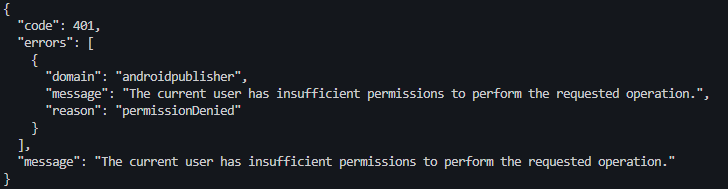
설정을 모두 제대로 마쳤는데도 401 오류가 발생해 꽤 오래 어려움을 겪었습니다.
당시에는 상품을 먼저 등록한 뒤 서비스 계정을 만들고 권한을 설정한 상태에서 오류가 발생했습니다. 이후 상품 정보를 수정해 저장하고 다시 요청했을 때 문제가 해결됐습니다. 이 경험만으로 모든 401 오류의 원인을 등록 순서로 단정할 수는 없습니다. 401은 인증이 받아들여지지 않았다는 HTTP 응답이므로, 사용한 계정·토큰·대상 앱의 접근 권한을 함께 확인해야 합니다.
당시에 시도한 방법은 인앱 상품의 이름이나 설명을 조금 수정해 저장한 뒤 다시 요청하는 것이었습니다. 아래 링크는 이 문제를 조사하면서 참고한 당시 사례입니다.
2. Google API 파라미터로 인한 400 오류
400은 보낸 요청의 값이나 형식을 서버가 받아들일 수 없다는 응답입니다. 이 사례에서는 API가 요구하는 구매 토큰 대신 다른 식별값을 보낸 것이 문제였습니다.
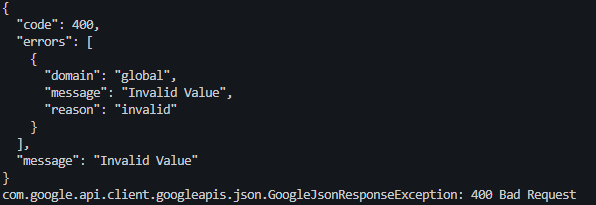
앞서 설명했듯 버전 변경과 잘못된 정보 때문에 어떤 값을 파라미터로 사용해야 하는지 혼란스러울 수 있습니다. 잘못된 파라미터를 사용하면 400 오류가 발생하므로 주의 깊게 확인해야 합니다.